Concepts Reader: a backup plan for my life
I manage my entire life in Concepts, the infinite canvas drawing app for iPad.
Open full app in new tab | Source code on GitHub
Not notes. Not lists. Graphs.
I draw what I call TODO graphs: dependency diagrams where tasks, ideas, and projects connect to each other visually. Every area of my life, work, personal projects, long-term goals, exists as interconnected nodes on an infinite canvas. This isn't a productivity hack. It's how my brain works.
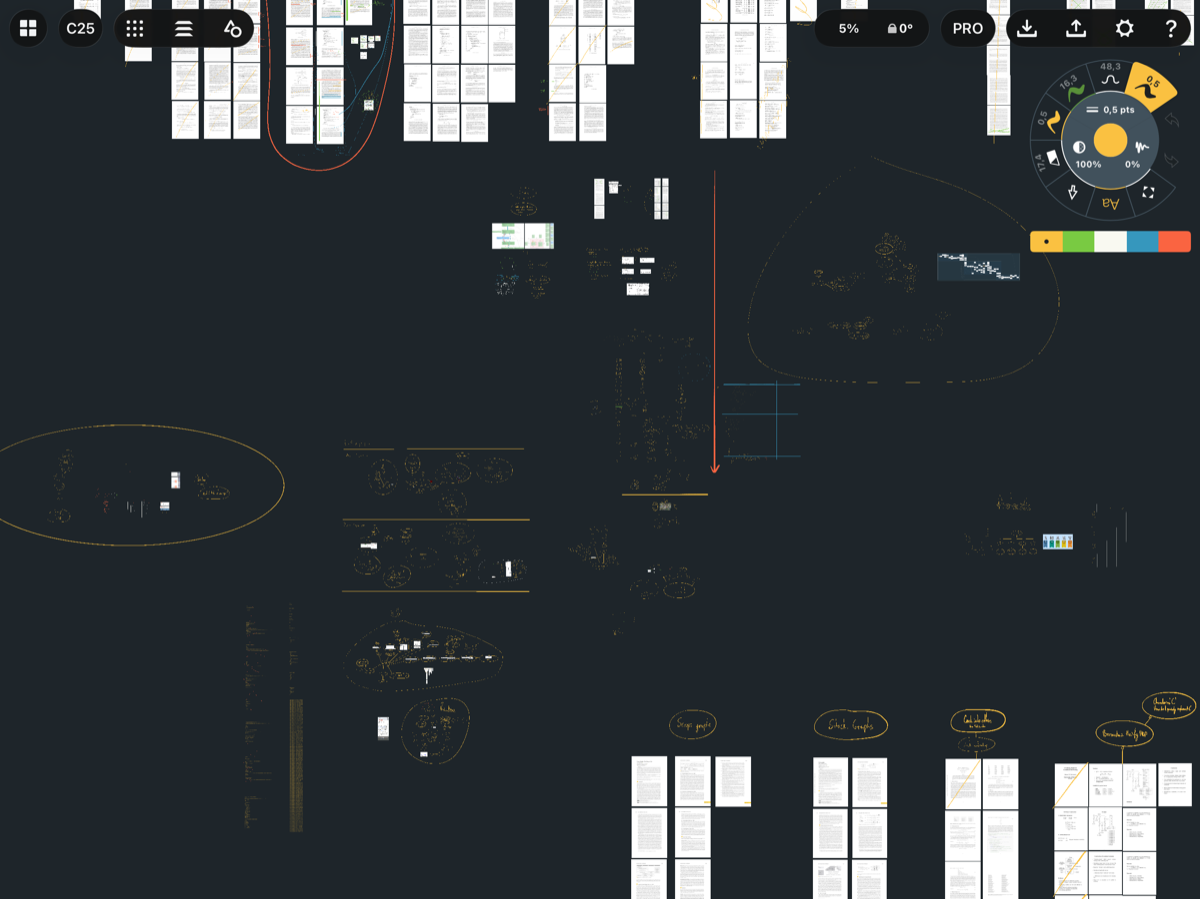
An example board. Center: current TODOs. Periphery: research papers I'm reading or implementing. The graphs have topmost nodes with no dependencies, those are tasks I can work on today.
The Concepts team has been stellar. Responsive support, thoughtful updates, a product that genuinely feels like it was made for people who think visually. I've been a happy user for years.
But recently, I've been worried.
The Problem with "Infinite"
My boards have grown. A lot. Some of them are now gigabytes in size. I've already had to buy a new iPad once because older devices couldn't handle the memory requirements. The app occasionally struggles with rendering performance on my largest canvases.
This isn't a complaint about Concepts. They're doing impressive work pushing the boundaries of what's possible on an iPad. But the reality is that my use case is extreme, and there's always a chance that future updates, iOS changes, or simply the accumulation of more data will eventually break things beyond repair.
And if that happens? My "life" is trapped in a proprietary format.
Well, it happened before.
One day my board simply wouldn't open on my iPad anymore. I felt lost. Luckily, you can AirDrop boards to your computer, and I discovered that .concept files are just ZIP archives. I tried compressing the embedded images to reduce the file size. That didn't work. The runtime apparently uses raw pixel data, so compression doesn't help. I had to manually replace images with smaller versions until the board would load again.
That was the first time I started to have trust issues.
Recently, performance problems appeared. Scrolling became sluggish. I couldn't reproduce the issues in other boards. Support asked me to share my board so they could investigate.
Share my board? Share my life with them? No.
Building a Safety Net
So I wrote a viewer. Just a proof of concept to answer one question: if Concepts stops working for me tomorrow, can I still access my data?
The answer is yes.
The app above is written in Flutter. Drop a .concept file onto it, and it renders all your strokes and images. Pan around, zoom in, see your work.
It's not Concepts. You can't edit anything. But you can see everything. And sometimes that's enough.
What's Inside a .concept File
Turns out, .concept files are just ZIP archives with a specific structure:
Strokes.plistcontains all the stroke data in Apple's binary plist formatResources.plistmaps image references to actual filesDrawing.pliststores the document's transform matrixImportedImages/holds embedded images
The stroke data itself is straightforward: arrays of points with pressure, color, and brush information. Parsing it required writing a binary plist parser, but the format is well-documented.
Why Flutter?
I wanted this to run everywhere. Web, desktop, mobile. Flutter made that trivial. The same codebase works on all platforms, and the web version means anyone can try it without installing anything.
Work in Progress
The viewer isn't feature complete yet. Some strokes render incorrectly. Concepts is a complex app that supports many use cases, and supporting them all is not straightforward.
If you find bugs, please report them on GitHub. A minimal repro file helps a lot.
The Lesson
This isn't about incompatibility or Concepts doing something wrong. Concepts was never designed to be a production-grade research tool or a graph visualization system. I've been surprised time and time again by how far it goes, how much it handles, how well it scales. The team has exceeded every reasonable expectation.
But the real question is: what happens when you reach the limits of your tool and there's no alternative that supports your use case?
That's why having a backup plan matters. Not because your tool will fail you, but because you might outgrow it. A read-only viewer won't replace what you've built your workflow around, but it means your data isn't trapped if you ever need to move on.
Addendum: PDF Support
I've added PDF rendering support to the viewer, and I'm impressed.
Flutter renders PDFs much better than Concepts does, without the stutters I experience in Concepts when navigating large boards with many PDF pages. This surprised me. Concepts claims to have a custom renderer, so I assumed they would be highly optimized for exactly these use cases. Apparently, you don't need a custom renderer if you're using a good framework like Flutter.
There are a couple of possible explanations. I'm rendering PDF pages at a lower resolution than Concepts does. Additionally, on a macOS desktop, I have all my RAM available, whereas iPads heavily limit RAM usage per app, even if the device has more RAM than is currently being used. There's an upper limit that each app can use, regardless of what's actually available.
Links: